
Learn the basics of Notion AI with examples and use cases.
Notion has jumped into the whole AI scene, making its workspace slicker than ever before. You can now tap into the sweet perks of AI right inside Notion.
The first question that pops your mind is, “What is Notion?” If you haven’t heard about Notion yet, let me fill you in.
Notion’s like the Swiss Army knife of apps—you can use it for project management, tracking tasks, taking notes, writing up docs, whipping up Wikis, and so much more. And trust me, that’s just scratching the surface; there’s a ton you can do within its workspace.
Let’s say you want a quick repository of all the documentation related to your application. Instead of whipping up a web page and spending hours designing the header and footer, uploading the content, and formatting it, you can just upload the documentation to a notion’s workspace and create an index or a table of contents. Publish it on the web, and voila! You have got yourself a decent webpage with links to all the documentation.
This tutorial is a general introduction to Notion AI. It shows you a few use cases of how to use AI to save time and resources.
In this tutorial, you’ll learn about:
- What is Notion AI
- Using the AI in Notion Workspace
- Accessing Notion AI
What is Notion AI
Notion AI provides features similar to other AI writing tools like ChatGPT. The main difference is that it’s tailored specifically to boost your productivity within the Notion workspace.
Powered by GPT-4, Notion AI allows you to enter a prompt describing what you want, and it will generate a relevant response based on that. It’s a simple but highly effective approach.

Using AI in Notion Workspace
Now, let’s explore how you can use Notion AI to your advantage. You can accomplish a lot in a short amount of time to enhance your productivity. Here are some common use cases for Notion AI:
Generate new content
Tired of staring at the blank screen, thinking about how to start writing? You can now prompt Notion AI to generate some fresh content for you. Write a blog post, an email, an essay, a job description, a social media post, and more by typing backward slash and selecting the appropriate feature in the menu—press ‘space’ to access Notion AI directly.

Important to know: We are using the free version. You can get Notion AI for $10/month. It will show you the writing specifics to help you decide.

After selecting the content type, write a prompt. We used the following:
Prompt:
Write an introductory paragraph for a blog post about the most advanced large language model (LLM).

Apart from generating a wide range of content types, you can create a table, a list of items, images, GIFs, and basically anything that crosses your mind. There’s room for you to play around and see what sticks.
For example, we ask Notion AI to create a flow chart of the working of an LLM. Here’s what it generated:

Revise existing content
Have existing content that doesn’t meet your standards? You can ask Notion AI to revise or summarize existing content. Especially summarize! If you don’t feel like reading, copy/paste the content in Notion and ask the AI to summarize it into a few sentences. It helps you understand the context easily without going through the entire thing and getting disappointed at the end! It saves a lot of time and effort, doesn’t it?


It summarized the entire chunk of content into a few points that can be consumed easily.
Let’s ask Notion AI to rewrite the existing content, making it easy to read while focusing on the main points.
Prompt:
Rewrite to make it an easy read. Focus on the main points.

Brainstorm Ideas
Notion AI is great for brainstorming ideas. Just give it a topic, and it’ll quickly generate a bunch of creative ideas for you to work with.

Click ‘Brainstorm ideas and write a prompt.
Prompt:
Brainstorm ideas on how to create a flow chart of a stepping motor.
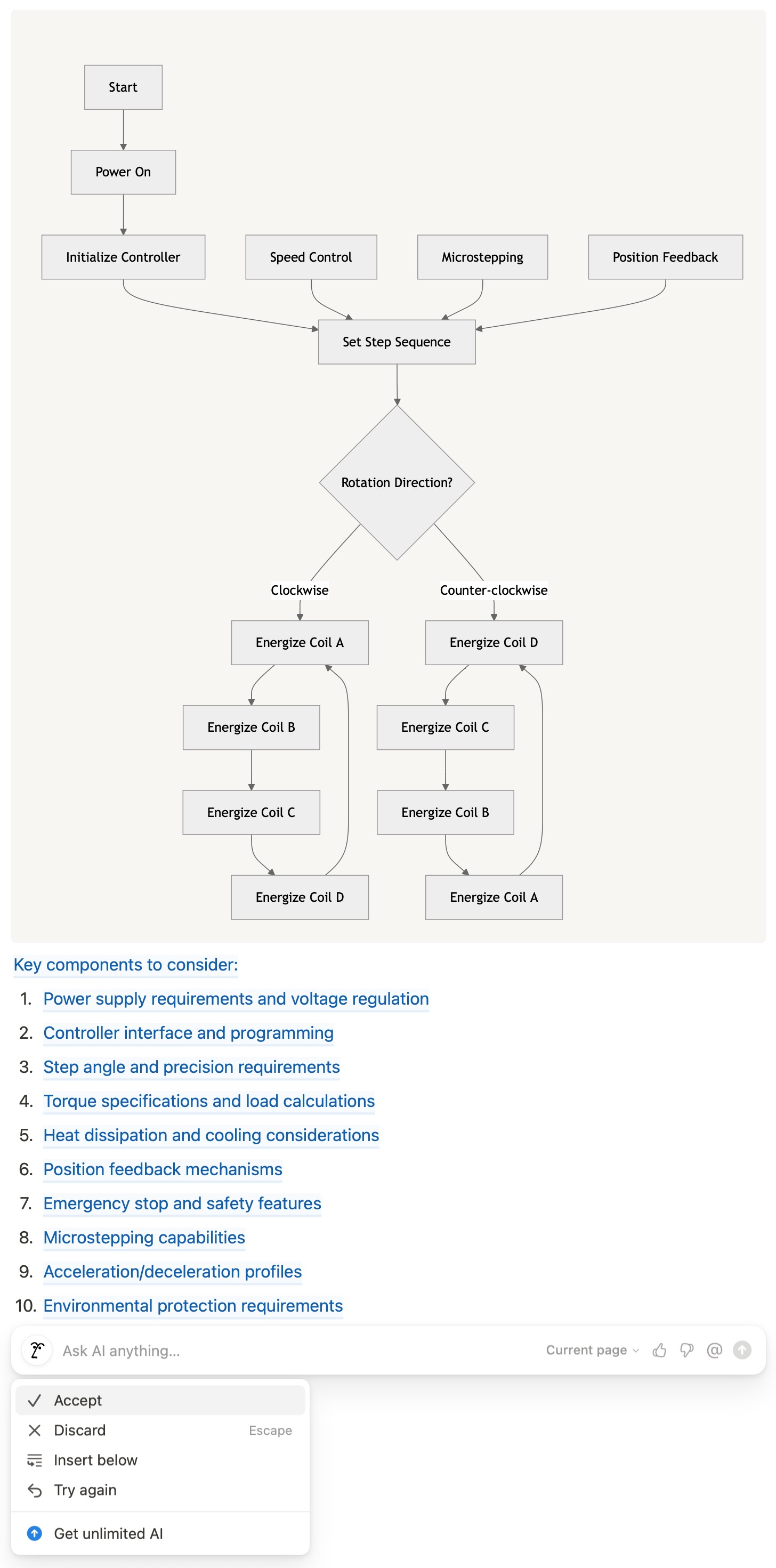
You can take those ideas as a starting point, combine them with your creativity, and develop something amazing for your next project.
Write Drafts
Notion AI can also help you draft content to get the ball rolling. For instance, you can ask it to create a blog outline, which you can then build on to write the full piece.

You can easily tweak that draft to match your style and preferences and publish it. It’s as simple as that.
Analyze Meeting Notes
Struggling to pull out the key points from a heap of messy meeting notes? Let Notion AI handle it.
It can summarize your notes or create a list of action items for you to tackle. This is especially handy when you’re pressed for time and need to prepare a presentation based on those notes.
Prompt:
Summarize these meeting notes.

Fix Spelling and Grammar
Need help polishing your writing? Notion AI can proofread your work, catching spelling and grammar mistakes effortlessly.


It saves you the hassle of manually combing your work for spelling or grammatical errors.
Translate Content
Notion AI can also translate your content into Spanish, French, German, Chinese, Korean, and more languages. This feature makes connecting your content with a global audience easier.
Select the text and click ‘Ask AI.’ Select ‘Translate to’ and then click the desired language.

The translation came out really well.

Conduct In-Depth Research
Notion AI can be your go-to assistant for projects that demand thorough research. It eliminates the need to switch between Google or other search engines by delivering the relevant information and context right in your workspace.
Prompt:
Search the web and provide suggestions for each point.

All of this can be done right within Notion. Simply type in your query or request, and Notion AI will take care of the rest.
Accessing Notion AI
If you own a Notion workspace, you can use Notion AI. It starts with a free trial, giving you a limited number of responses to explore its features. Once the trial ends, you can keep using the AI tools for a monthly subscription fee of $8 to $10 per member.
There are several ways to activate Notion AI:
- Open a blank page and hit the spacebar.
- Highlight text and select “Ask AI.”
- Use slash commands ( / ) to access it directly.

If you’re already a Notion fan, you’ll appreciate the added power Notion AI brings. It’s an excellent tool for improving your productivity and content creation.
While it’s not perfect and might need some fine-tuning, it’s more than capable of helping you get started. Just make sure to fact-check its outputs and tweak the content to match your style and goals.
Take some time to explore what Notion AI can do and figure out which features work best for your needs. I’m sure you’ll discover some exciting ways to put it to good use!